Friday, April 17, 2015

SimCity Buildit Hack

SimCity Buildit Hack

Application: SimCity Buildit
Version: 1.2.23
Link to iTunes: Here
Application description: “WELCOME MAYOR! We’re glad to have you on board. Your first order of business – create your own gorgeous, unique city that has citizens vying to move in. But remember, the larger your city gets, the more needs your citizens have. This is an all-new SimCity game – re-imagined for mobile!”
Hack description: Hi guys, I have much more better hack for SimCity Buildit v1.2.19 for Jailbroken iOs devices, and it works for online and offline mode. You can use this hack on your existing city which has been linked to your facebook account.
This hack will allow you to modify any value and therefore it will be possible for you to get unlimited amount of Simoleons, SimCash, Golden Keys and Experience. Additionally for this hack I will show you the way how you can change your City name in different font, which I find quite cool!


Steps for Simoleons, SimCash and Experience hack will be the same, however hack for Golden Keys will be a little bit trickier, but it’s not too hard so don’t worry, you will be able to do it in no time, just follow my steps!
You need to download and install one of the following app’s.
  • GamePlayer (Add repo in Cydia -> http://cydia.myrepospace.com/broofthecentury, then search for GamePlayer, also I suggest to install GamePlayer – No waiting time. This will disable annoying waiting time each time when you change value.)
  • GameGem (No repo needs to be added, jus search for it in Cydia.)
Now when you have installed one of the applications, you can continue by following to next steps.
Simoleons, SimCash and Experience:
1.) You need to launch GamePlayer/GameGem (In this tutorial I will use GamePlayer).
2.) Launch SimCity and then head back to GamePlayer and choose SimCity in applications menu.

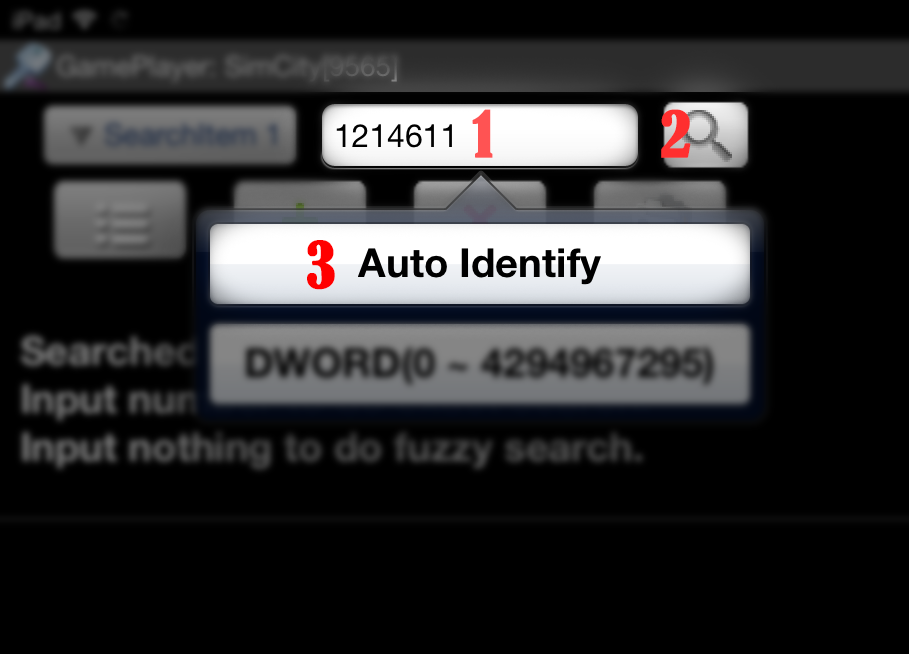
3.) Next write down the number of Simoleons you have, in my case I got 1214611 Simoleons.
4.) Head back to GamePlayer and enter the amount of Simoleons in search bar (1) then press search button (2) -> Auto Identify (3), it should find multiple values.
5.) Go back to SimCity and this time when your game resumes go and earn/spend some Simoleons. I just built Residential Building and got some Simoleons from this action. Now I have 1219090 Simoleons. Write down how much Simoleons you have.
6.) Return to GamePlayer and this time search for the new value. In my case I was searching for 1219090 and I got 6 values in return.
7.) Now you need select each value, and apply following options:
Operation – Modify & Store (This will allow you to change amount of Simoleons without going through previous steps.)
Name – Give random name. I stored each value with name – Simoleons.
Value – The amount of Simoleons you wish to have. I changed value to 3456789.
8.) When you press on folder icon, you can view your stored values and edit them later.
9.) If you head back to SimCity app, you will notice that the amount of Simoleons has been changed.
You can repeat steps starting from 3, and instead of changing value for Simoleons, you can use value from SimCash and Experience, also works for level number.
Golden Keys:
1.) First get some SimCash or Simoleons by following previous steps.
2.) Open GamePlayer and start new search by searching the number of Golden Keys you currently have, in my case I got 0 Golden Keys, so was searching for 0 and I got 900601 items.
3.) Return to SimCity application and go to Cargo Ship Dock and pack everything and press on “Cast Off” button.
4.) You will get 1 Golden Key, before you go to GamePlayer app, go back to Cargo Ship Dock and pay 10 SimCash for Cargo Ship to return now to avoid waiting 6 hours.
5.) In GamePlayer this time search the new amount of Golden Keys you have, in my case now I have 1 Golden Key. By Searching I get still too many search results, therefore I repeated steps 3 to 5 few more times. Usually if search returns you less than 8 items, then you can safely start editing the values.
6.) Go ahead and edit all values when the search returns less than 8 items.
Operation – Modify & Store.
Name – Goldent Keys. It’s up to you how you wish to name it.
Value – The amount of Golden Keys you wish to have. I changed value to 98760.
7.) When you go back to SimCity application you will see that the amount of Golden Keys has been changed. In case id didn’t worked first time, repeat all steps until it works.
http://gamelofthack.com/

Modern Combat 5 Hack

Modern Combat 5 Hack


Hello, after a few weeks of work today we are presenting you our new  hack Modern Combat 5 screen.   We are really happy with the final reason we can provide stunning this hack you. Make of this application is not simple. It really is difficult and it takes a considerable measure of our time. Many people approach us for Modern Combat 5 Screen   Cheat  Tool, so we have this hack them.   Working  variant of the 5 Screen Hack Modern Combat can only visit our website Modern Combat 5 Screen Hack makes you happy. With Modern Combat 5 screen you can get countless professional focus or incite god mode! With this amazing screen Modern Combat 5 cheats you can get it with a few simple steps! Download our selection Hack (you must complete the study with true information), run it, choose what you need and delight! We also just added   Greed for Glory Hack war strategy  here!

About  Modern Combat 5 Blackout


Proud to be the "App Store's Best of 2014" in 28 countries! Download  Itunes .
* Note * Modern Combat 5 requires an iPad 2 (or later), iPhone 4s (or later), or iPod touch 5th generation An Internet connection is required to play.
> "It plays as good as it looks." - IGN
> "Amps everything up to the next level." - 148Apps
> "Control Sharp, impressive graphics." - Pocket Gamer
Jump into the action as the latest installment in the series raises the bar for the best FPS shooter again! Create a team, add your friends, and check your personal skills and your team against other teams!
The only player that's you? Then step into a world on the brink of anarchy and shoot your way out of a dire situation again to reveal a lunatic, who are trying to destroy the world to pieces.
CHOOSE YOUR FAVORITE CLASS
> 4 custom classes that you can upgrade across single- and multiplayer
> Find the style of play suits you: Assault, Heavy, Recon, or Sniper
> Activate skills specific class by income and spending Skill Points
HIGH-POWERED MULTIPLAYER
> Epic clash in group vs. Squad Squad fit
> Talk to other players in the global and chat Squad
> Individuals and leaderboards Squad
> Win cool prizes in the event limited time
Progression UNIFIED
> Earn XP and level up by playing both single-player missions and multiplayer game
> Unlock weapons higher level by mastering the lower level
> Customize your perfect weapon using a variety of attachments

About  Modern Combat 5 Monitor Hack

Our staff consists of three people. Mike, who cares for the site as well as images that have been prepared in the development of the hacks and cheats. Two great guy, Jack and Mr.Anpha, is one of the leading hacker on earth. Two years ago, they took first place in the contest programmers worldwide. Hack and cheats produced by the folks. Set the Screen Hack Modern Combat 5 required from them eight hours. As a group we like to work together on tasks. Generally our hobby hacking, but thanks to the generosity of our marketing, we can make a modest amount, which allows us to operate our website.  

Modern Combat 5 Screen Hack Free Trial Version


Modern Combat 3 5 Screen Hack Available online server


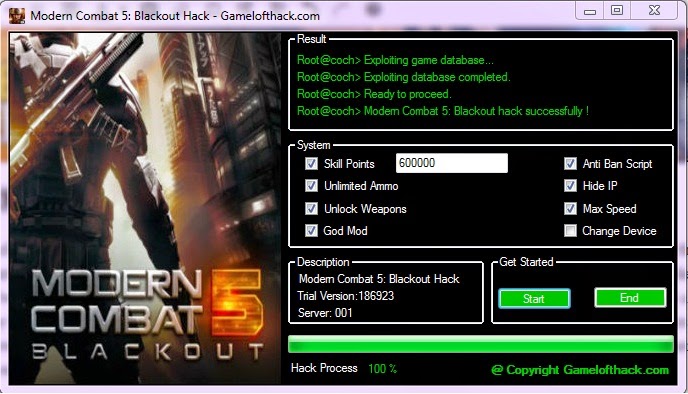
Modern Combat 5 Screen Hack Screenshot


Note: This is a free trial version. You can use the hack in a day. After the hearing, if you are satisfied with this hack. You can purchase the full version, the life of service, updated 24/7 for $ 9.99.  United States here to buy the full version!

Modern Combat 5 features Screen Hack

  • Get Unlimited Ammo
  • * Enable God Mode and Speed ​​Hack
  • * Unlock all weapons
  • * Full automatic update tool for the launch!
  • * Undetectable, safe and effective (100% guarantee)
  • * User-friendly interface and Plug & Play Support!
  • No Root Required * Jailbreak!
  • * Works for all Android and iOS devices (including iPhone, iPad, iPod)  

How to Use Modern Combat 5 Monitor Hack 

  1. Download and run Modern Combat 5 Screen Hack (Only Gamelofthack.com)
  2. Use the free trial version or enter keywords to use the full version.
  3. Connect your device and server lease available online.
  4. Select the type or number of desired features.
  5. Click Start and wait a while.
  6. After successfully added feature, you can disconnect your device.
  7. Start the game.

Download Modern Combat 5 Monitor Hack 


http://gamelofthack.com/

Sunday, March 29, 2015

Play Android Games on Pc Without Bluestacks


Play Android Games on Pc Without Bluestacks


Hey guys, today i have a tutorial on how to play Android games on pc without Using Bluestacks emulator. Andy emulator is also 
one of a best emulator for playing android games on your pc. Andy is also provide a feature to use your phone as a remote control when playing games on your pc.

Andy Emulator : http://www.andyroid.net
Intel® HAXM : http://goo.gl/h0vCx1


                                                                             DOWNLOAD

6 Ways to Play Android Games on Windows PC

6 Ways to Play Android Games on Windows PC


It is not always possible to go with the installation and un-installation processes for checking each and every app on your smart phone or tablet. Better, you find some way to play the Android Games on a Windows PC which have a sufficient memory and space.
Playing Android Games on a Windows PC is not so hard as Intel has decided to launch “Dual OS” PC with Windows 8 and Android platform. This lets you booting your computer directly into the Android system, hence installing the apps or games on your PC. But, you won’t have to buy a new PC only for the purpose of playing a Game. Plenty of Android app emulators are available to run Android Games and Apps in almost all Windows environment.
In this article, we’ve brought 6 various ways to play Android Games on Windows 7, Windows 8 and even on Windows XP. Not only the games but you can also run any Android app at the Windows system.

1. Install BlueStacks to Play Android Games on PC

BlueStacks is a Android emulator which does not actually replace your operating system. Rather, it acts just like another software which is easy to install. Once you install it, you can run BlueStacks into a separate window at your Windows desktop.
The BlueStacks environment is very similar to that of Android. It allows you to connect with Google Play store and install the apps and games at you emulator. If you grab the APK file from your friends device or download it from somewhere else, you can still install that game/app at your computer using BlueStacks. Thus, you can install and play any android game at your Windows computer. This way you can also run WhatsApp on a PC.

2. Install Android SDK to run Android Games on PC

Another alternative is the Android SDK, the official emulator for the Android app developers by Google. This tool is not a suitable choice for the daily use as it is slower and difficult to configure. This is actually useful for the developers to test the apps.
If you are willing to go with it, download the Google’s Android SDK and open the SDK manager program. Now, select Tools > Manage AVDs. Here, you can create the Android Virtual Device with your own configuration. Once created, click the ‘Start’ button to launch it.

3. Play Android games on Genymotion, an alternative to BlueStacks

Another Android emulator is Genymotion which is quite impressive with its speed and features. It can be considered as the best alternative of BlueStacks.
It allows drag-and-drop installation of apps and games. You can test any app or game in a big screen. It also supports the sensor system and open GL.
You can download Genymotion from here.
4. Run Android Apps and Games from your Browser
Unlike the above desktop based Android emulators, Manymo which is a browser based emulator does not require any installation or complex configuration to run the Android apps. Just browse this link and upload your app to test. The interesting thing about Manymo is that you can embed any Android app or game at any webpage by using this browser based emulator.
5. Use Android X-86
This is a the desktop version of the Android OS which can be run natively in AMD and Intel processors. You can install this version just like you install the Windows or Linux operating systems in your x-86 based computers.
As Android X-86 is a community project, it currently supports a few number of devices like Del Inspiron Mini Duo, Samsung Q1U, ASUS Eee PCs, Viliv S5, Lenovo ThinkPad x61 Tablet and Viewsonic Viewpad 10.
Another interesting thing about Android X-86 is that you can install it on a virtual machineusing VMware or Virtual box.
6. Use Live Android to run Android Games on PC
Live Android is another complete OS for Android games and apps which can boot separately in a laptop or desktop computer. As it is an OS, you can also install it in VMware or Virtual Box to test the Android apps and games.

Conclusion:
A lot of Android emulators has been available from the past few years but to be frank, they did not have any purpose. The touch screens with Windows 8 and Tablets gave a reason of using them to test various Android games and apps out of almost 750000 in count.

http://www.oxhow.com